_
Apple Wallet Passes and APNs in Node.js
Apple Wallet is a native iOS feature that lets users store cards, passes, and tickets directly on their device — boarding passes, event tickets, loyalty cards, and more. No app required to use them, no account to open. The card just lives on the phone.
For a business, this is more than a convenience. A Wallet pass is a persistent surface that stays visible to the user. The loyalty barcode is always one swipe away, the tier and balance can update silently in the background, and the business can push changes without asking the user to reinstall anything or open the app.
This article focuses on the backend side only: generating and signing .pkpass files,
setting up PassKit endpoints, and sending silent APNs push notifications. The mobile side is out of scope.
This is based on a real task I worked on. The exact code is covered by NDA, so what you see here is rewritten from scratch to preserve the idea — not the original source.
What Apple Wallet Actually Needs From Your Backend
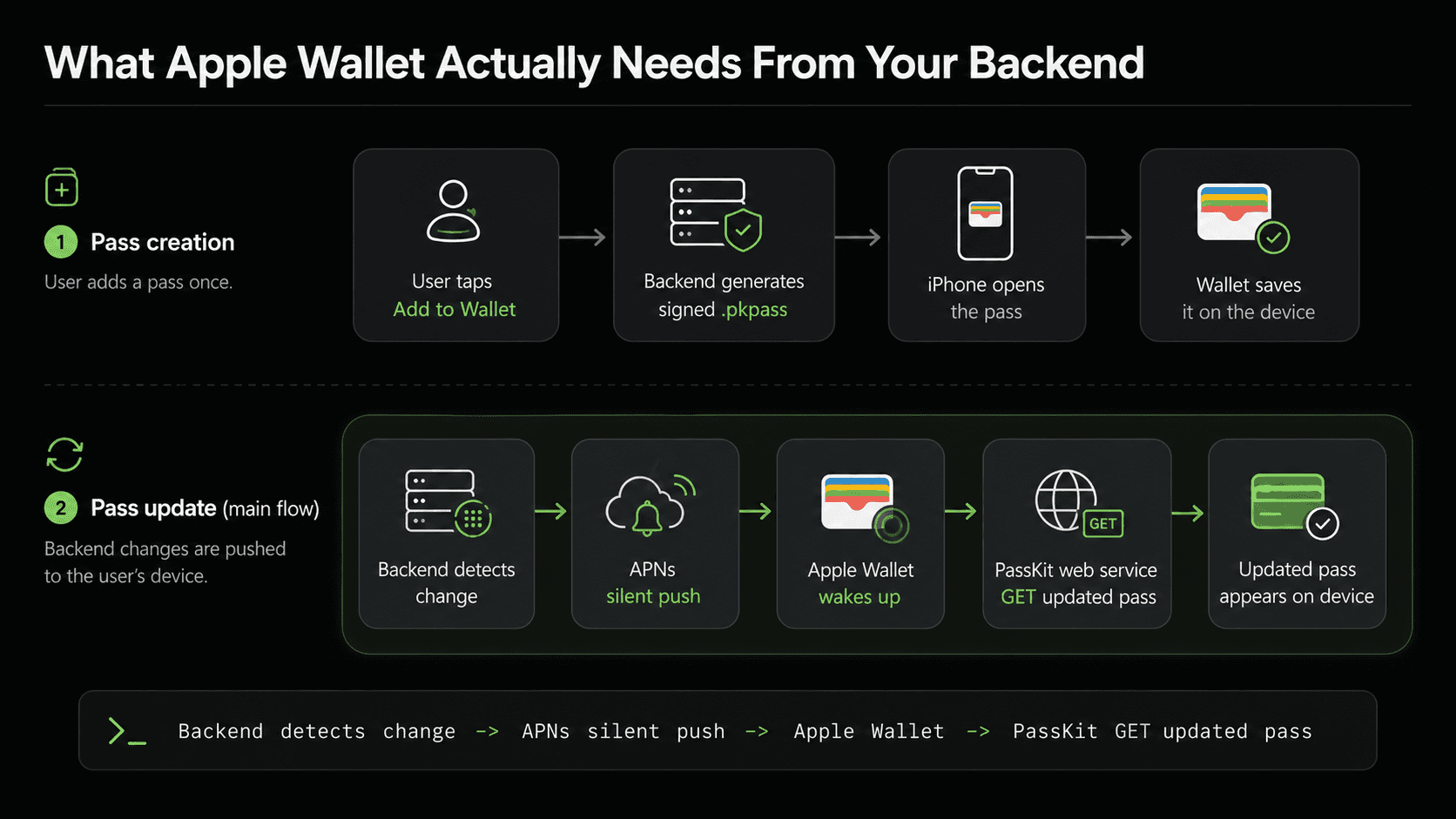
From the backend perspective, there are two flows that matter.
Pass creation. When the user wants to add a pass to Wallet,
the backend generates and returns a signed .pkpass file. Mobile opens it,
the system prompt appears, and the pass is saved to the device.
Pass update. When something changes in the backend — loyalty tier, balance, barcode — the pass on the device needs to reflect that. Apple Wallet does not poll your backend for changes. Instead, your backend sends a silent push notification through APNs. That notification is a wake-up signal: Wallet receives it, calls your PassKit web service, and downloads the updated pass.
Step 1: Generating the pkpass file
For building the pass I used passkit-generator:
npm install passkit-generator node-forge
The endpoint is straightforward — it delegates to the service and streams the binary back:
router.get(
  "/pass",
  auth(),
  async (req, res) => {
    const buffer = await AppleWalletPassService.createPass({
      userId: req.userId,
    });

    res.setHeader("Content-Type", "application/vnd.apple.pkpass");
    res.setHeader("Content-Disposition", 'attachment; filename="loyalty.pkpass"');
    res.send(buffer);
  }
);
The service loads the signing certificates, builds the pass from a template, fills in the user data, and returns a buffer:
import path from "path";
import fs from "fs";
import { PKPass } from "passkit-generator";
import forge from "node-forge";

class AppleWalletPassService {
  public static async createPass({
    userId,
  }: {
    userId: number;
  }): Promise<Buffer> {
    const details = await LoyaltyService.getLoyaltyPassDetails({
      userId,
    });

    const signingData = this.loadSigningData();

    /*
      This token gets embedded into the .pkpass file at generation time.
      Every time Apple Wallet calls the PassKit web service — to register a device,
      check for updates, or download a refreshed pass — it sends this token back
      in the Authorization header: "Authorization: ApplePass <token>".

      We encrypt the customer context into it so that when Apple calls us,
      we can identify the user without a separate session or JWT lookup.
    */
    const authenticationToken = Encrypter.encrypt({
      userId,
    });

    const pass = await PKPass.from(
      {
        model: path.join(
          process.cwd(),
          "assets",
          "apple-wallet",
          "loyalty.pass"
        ),
        certificates: {
          wwdr: signingData.wwdr,
          signerCert: signingData.signerCert,
          signerKey: signingData.signerKey,
          signerKeyPassphrase: signingData.signerKeyPassphrase
        }
      },
      {
        serialNumber: details.barcode,
        teamIdentifier: process.env.APPLE_TEAM_IDENTIFIER,
        passTypeIdentifier: process.env.APPLE_PASS_TYPE_IDENTIFIER,
        webServiceURL: process.env.APPLE_WALLET_WEB_SERVICE_URL,
        authenticationToken
      }
    );

    pass.primaryFields.push({
      key: "name",
      label: "Member",
      value: `${details.firstName} ${details.lastName}`.trim()
    });

    pass.secondaryFields.push({
      key: "tier",
      label: "Tier",
      value: details.memberTier
    });

    pass.setBarcodes({
      format: "PKBarcodeFormatCode128",
      message: details.barcode,
      messageEncoding: "iso-8859-1"
    });

    return pass.getAsBuffer();
  }

  private static loadSigningData() {
    const certsDir = path.join(
      process.cwd(),
      "certs",
      "apple"
    );
    const wwdrPath = path.join(certsDir, "AppleWWDRCAG4.cer");
    const p12Path = path.join(certsDir, "PassCertificates.p12");
    const passphrase = process.env.APPLE_WALLET_SIGNER_KEY_PASSPHRASE ?? "";

    const wwdr = this.parseDerCertificate(fs.readFileSync(wwdrPath));
    const { signerCert, signerKey } = this.extractSignerFromP12(
      fs.readFileSync(p12Path),
      passphrase
    );

    return { wwdr, signerCert, signerKey, signerKeyPassphrase: passphrase };
  }

  private static parseDerCertificate(der: Buffer): string {
    const asn1 = forge.asn1.fromDer(der.toString("binary"));
    const cert = forge.pki.certificateFromAsn1(asn1);
    return forge.pki.certificateToPem(cert);
  }

  private static extractSignerFromP12(
    p12Buffer: Buffer,
    passphrase: string
  ): { signerCert: string; signerKey: string } {
    const p12Asn1 = forge.asn1.fromDer(p12Buffer.toString("binary"));
    const p12 = forge.pkcs12.pkcs12FromAsn1(p12Asn1, false, passphrase);

    const certBags = p12.getBags({ bagType: forge.pki.oids.certBag });
    const certList = certBags[forge.pki.oids.certBag];
    if (!certList?.length || !certList[0].cert) {
      throw new Error("Invalid PKCS#12: no certificate found");
    }
    const signerCert = forge.pki.certificateToPem(certList[0].cert);

    let signerKey: string | undefined;

    const shrouded = p12.getBags({
      bagType: forge.pki.oids.pkcs8ShroudedKeyBag
    });
    const shroudedList = shrouded[forge.pki.oids.pkcs8ShroudedKeyBag];
    if (shroudedList?.length && shroudedList[0].key) {
      signerKey = forge.pki.privateKeyToPem(shroudedList[0].key);
    }

    if (!signerKey) {
      const keyBags = p12.getBags({ bagType: forge.pki.oids.keyBag });
      const keyList = keyBags[forge.pki.oids.keyBag];
      if (keyList?.length && keyList[0].key) {
        signerKey = forge.pki.privateKeyToPem(keyList[0].key);
      }
    }
    if (!signerKey) {
      throw new Error("Invalid PKCS#12: no private key found");
    }

    return { signerCert, signerKey };
  }
}

export default AppleWalletPassService;
Certificates
To sign the pass you need three things from Apple:
AppleWWDRCAG4.cer— Apple's intermediate CA certificate. Download it from developer.apple.com/certificationauthority.PassCertificates.p12— your Pass Type ID certificate with private key. Create a Pass Type ID in the Apple Developer portal, generate a certificate for it, export it as.p12from Keychain Access.- P12 passphrase — whatever passphrase you set on export. Store it in an env variable, not in the repo.
Put both files in:
certs/
  apple/
    AppleWWDRCAG4.cer
    PassCertificates.p12
The loadSigningData method reads the files, checks they exist,
and converts them to the PEM strings that passkit-generator expects.
The two conversion helpers exist because Apple ships certificates in binary formats:
parseDerCertificate— converts the WWDR.cerfile from DER binary to PEM string usingnode-forge.extractSignerFromP12— unpacks the.p12container and extracts the signer certificate and private key separately, also as PEM. It tries bothpkcs8ShroudedKeyBagandkeyBagbecause different export tools put the key in different bag types.
The Pass Template
The pass template is a folder with a pass.json and a set of images.
passkit-generator uses it as the base — your code only overrides the fields that change per user at runtime.
The pass.json for a loyalty card looks like this:
{
  "formatVersion": 1,
  "passTypeIdentifier": "pass.placeholder",
  "serialNumber": "PLACEHOLDER",
  "teamIdentifier": "PLACEHOLDER",
  "organizationName": "Acme",
  "description": "Loyalty Card",
  "logoText": "",
  "suppressStripShine": true,
  "foregroundColor": "rgb(30, 30, 30)",
  "backgroundColor": "rgb(255, 255, 255)",
  "labelColor": "rgb(60, 60, 60)",
  "storeCard": {
    "headerFields": [],
    "primaryFields": [],
    "secondaryFields": [],
    "auxiliaryFields": [],
    "backFields": []
  }
}
The placeholders (passTypeIdentifier, serialNumber, teamIdentifier) are
intentional — passkit-generator replaces them with the real values from the PKPass.from() call.
The fields arrays are empty because the service pushes into them dynamically.
The images live in the same folder:
icon.png    icon@2x.png    icon@3x.png
logo.png    logo@2x.png    logo@3x.png
strip.png   strip@2x.png   strip@3x.png
thumbnail.png  thumbnail@2x.png
pass.json
Apple Wallet picks the right resolution automatically based on the device screen. The full list of required and optional images with their sizes is in the Apple developer docs.
Configuring Pass Fields
A storeCard pass has five field zones:
headerFields, primaryFields, secondaryFields, auxiliaryFields, and backFields.
Each zone maps to a specific area on the card face — primaryFields is the most prominent,
backFields is only visible when the user flips the card.
passkit-generator exposes each zone as an array you push into:
pass.primaryFields.push({
  key: "name",
  label: "Member",
  value: `${details.firstName} ${details.lastName}`.trim()
});

pass.secondaryFields.push({
  key: "tier",
  label: "Tier",
  value: details.memberTier
});

pass.headerFields.push({
  key: "points",
  label: "Points",
  value: details.pointsBalance,
  textAlignment: "PKTextAlignmentRight"
});
Each field needs a unique key, a label shown above the value, and the value itself.
textAlignment is optional and defaults to left.
One thing to keep in mind: Apple Wallet is not a flex layout. The number of fields that actually render depends on the pass type and layout rules. If you push too many fields into a zone, some may not appear. Start with a minimal set, verify on a real device, and add more only after confirming the layout looks correct.
Step 2: Setting Up Apple Push Notifications (APNs)
APNs (Apple Push Notification service) is Apple's service for delivering push notifications to iOS devices. In the next step we will use it to trigger pass updates — but first, let's set it up.
To authenticate with APNs you need:
AuthKey_XXXXXXXXXX.p8— APNs auth key. Generate it in the Apple Developer portal under Certificates → Keys. Unlike certificates, a single key works for all your apps.- Key ID — the 10-character ID shown next to the key in the portal.
- Team ID — your Apple developer team identifier, shown in the top-right of the portal.
Put the .p8 file in:
certs/
  apple/
    AuthKey_XXXXXXXXXX.p8
Install the package:
npm install @parse/node-apn
The service wraps the APNs provider with lazy initialization and exposes a sendNotification method:
import path from "path";
import apn from "@parse/node-apn";

class AppleNotificationService {
  private static providerInstance: apn.Provider | null = null;

  private static get provider(): apn.Provider {
    if (!this.providerInstance) {
      this.providerInstance = new apn.Provider({
        token: {
          key: path.join(
            process.cwd(),
            "certs",
            "apple",
            "AuthKey_XXXXXXXXXX.p8"
          ),
          keyId: process.env.APPLE_APN_KEY_ID!,
          teamId: process.env.APPLE_TEAM_IDENTIFIER!
        },
        production: true
      });
    }

    return this.providerInstance;
  }

  public static async sendNotification(
    pushToken: string,
    {
      title,
      body,
      topic
    }: {
      title: string;
      body: string;
      topic: string;
    }
  ): Promise<void> {
    const notification = new apn.Notification();
    notification.topic = topic;
    notification.alert = { title, body };
    notification.sound = "default";

    const result = await this.provider.send(notification, pushToken);

    const error = result.failed?.[0];
    if (error) {
      const message = error.response?.reason || error.error?.message || "APNs send failed";
      throw new Error(message);
    }
  }
}

export default AppleNotificationService;
topic is the bundle ID of your app (e.g. com.company.app).
APNs uses it to route the notification to the right app on the device.
In the next step we will add a separate method for wallet pass updates, which uses a different topic and an intentionally empty payload.
Step 3: Updating a Pass
When data changes — loyalty tier, points balance, barcode — the pass on the device needs to reflect that. Apple Wallet does not poll your backend, so you need to trigger the update yourself.
The flow looks like this:
- Something changes in your system.
- Your backend sends a silent push notification through Apple Push Notifications (APNs) to every device that has the pass installed.
- Apple Wallet receives it and calls your PassKit web service to check what changed —
authenticating with the
authenticationTokenthat was embedded in the pass at creation time. - Your backend returns the updated
.pkpass.
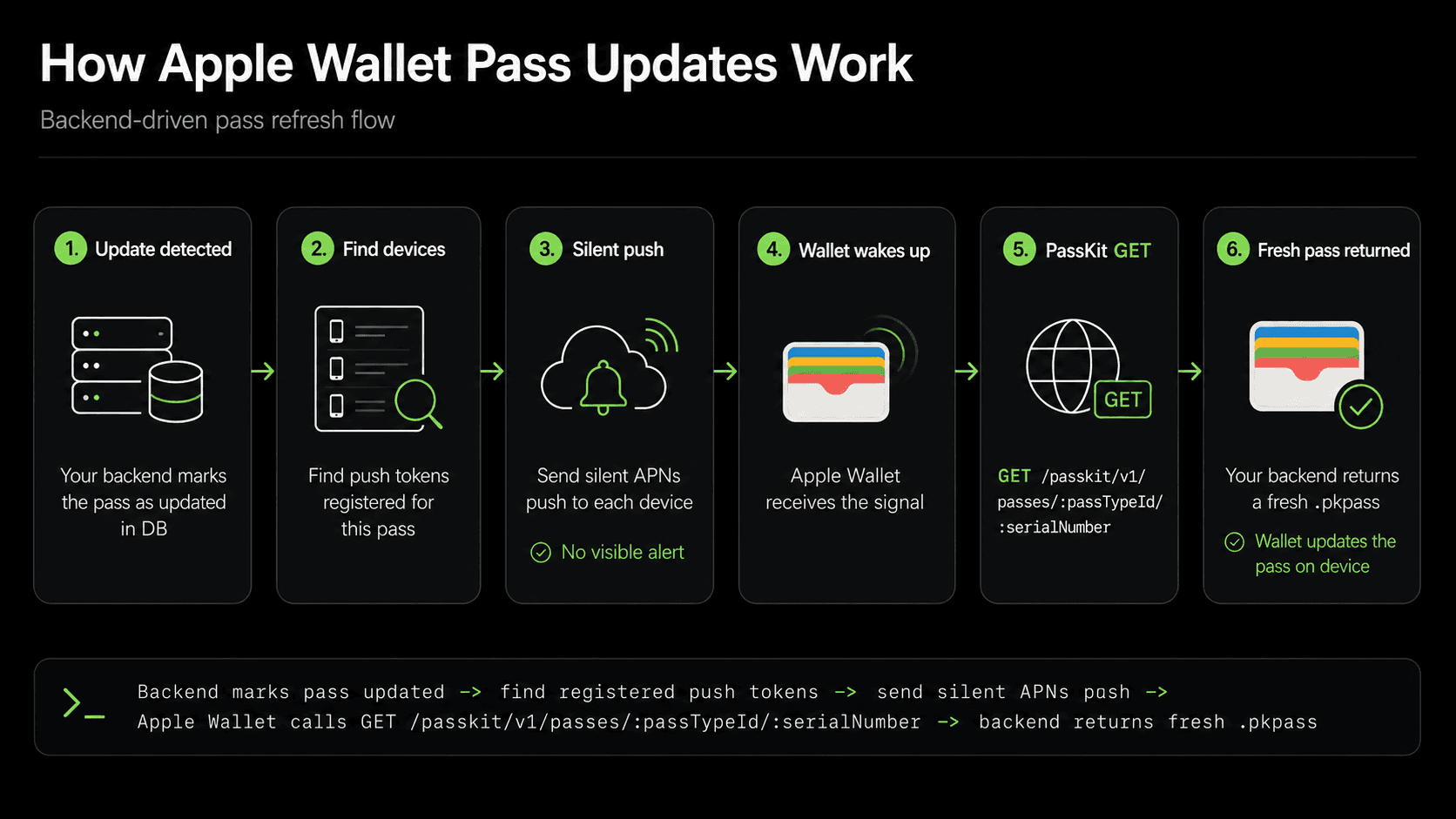
The key thing I got wrong before building this: I assumed the backend pushes the new pass directly to Apple. That is not how it works. APNs is only a wake-up signal — an empty notification that tells Wallet "something changed, come check." The actual pass content is always pulled by Wallet from your PassKit web service.
PassKit Web Service Endpoints and Device Registration
After a pass is installed, Apple Wallet talks to your backend directly.
We implemented the core endpoints under:
/api/apple-wallet
The important routes are:
POST   /passkit/v1/devices/:deviceLibraryIdentifier/registrations/:passTypeIdentifier/:serialNumber
GET    /passkit/v1/devices/:deviceLibraryIdentifier/registrations/:passTypeIdentifier
DELETE /passkit/v1/devices/:deviceLibraryIdentifier/registrations/:passTypeIdentifier/:serialNumber
GET    /passkit/v1/passes/:passTypeIdentifier/:serialNumber
When the user adds the pass to Wallet, it calls POST /devices/... with a pushToken.
That token is what we later use to send APNs notifications to that specific device.
We store it in the database.
The approximate model:
type WalletDeviceRegistration = {
  id: number;
  deviceLibraryIdentifier: string;
  pushToken: string;
  passTypeIdentifier: string;
  serialNumber: string;
  passContentUpdatedAt: Date | null;
  createdAt: Date;
  updatedAt: Date;
};
All five endpoints:
router.post(
  "/passkit/v1/devices/:deviceLibraryIdentifier/registrations/:passTypeIdentifier/:serialNumber",
  passKitAuth,
  validateBody({
    pushToken: Joi.string().required()
  }),
  async (req, res) => {
    await WalletDeviceRegistrationService.register({
      deviceLibraryIdentifier: req.params.deviceLibraryIdentifier,
      pushToken: req.body.pushToken,
      passTypeIdentifier: req.params.passTypeIdentifier,
      serialNumber: req.params.serialNumber
    });

    res.status(HttpStatusCode.CREATED).json({ success: true });
  }
);

router.delete(
  "/passkit/v1/devices/:deviceLibraryIdentifier/registrations/:passTypeIdentifier/:serialNumber",
  passKitAuth,
  async (req, res) => {
    await WalletDeviceRegistrationService.unregister({
      deviceLibraryIdentifier: req.params.deviceLibraryIdentifier,
      passTypeIdentifier: req.params.passTypeIdentifier,
      serialNumber: req.params.serialNumber
    });

    res.status(HttpStatusCode.OK).json({ success: true });
  }
);

router.get(
  "/passkit/v1/devices/:deviceLibraryIdentifier/registrations/:passTypeIdentifier",
  passKitAuth,
  async (req, res) => {
    const result = await WalletDeviceRegistrationService.getSerialNumbersForDevice({
      deviceLibraryIdentifier: req.params.deviceLibraryIdentifier,
      passTypeIdentifier: req.params.passTypeIdentifier,
      passesUpdatedSince: req.query.passesUpdatedSince as string | undefined
    });

    if (!result.serialNumbers.length) {
      return res.status(204).end();
    }

    res.json(result);
  }
);

router.get(
  "/passkit/v1/passes/:passTypeIdentifier/:serialNumber",
  passKitAuth,
  async (req, res) => {
    const lastModified = await WalletDeviceRegistrationService.getPassContentUpdatedAt(
      req.params.serialNumber
    );

    const ifModifiedSince = req.get("If-Modified-Since");
    if (ifModifiedSince && lastModified && new Date(ifModifiedSince) >= lastModified) {
      return res.status(304).end();
    }

    const buffer = await AppleWalletPassService.createPass(req.passKitAuth);

    res.setHeader("Content-Type", "application/vnd.apple.pkpass");
    res.setHeader("Content-Disposition", 'attachment; filename="loyalty.pkpass"');
    if (lastModified) {
      res.setHeader("Last-Modified", lastModified.toUTCString());
    }
    res.send(buffer);
  }
);
The full service:
class WalletDeviceRegistrationService {
  public static async register({
    deviceLibraryIdentifier,
    pushToken,
    passTypeIdentifier,
    serialNumber
  }: {
    deviceLibraryIdentifier: string;
    pushToken: string;
    passTypeIdentifier: string;
    serialNumber: string;
  }): Promise<void> {
    await WalletDeviceRegistration.upsert(
      {
        deviceLibraryIdentifier,
        pushToken,
        passTypeIdentifier,
        serialNumber
      },
      {
        conflictFields: ["deviceLibraryIdentifier", "serialNumber"]
      }
    );
  }

  public static async unregister({
    deviceLibraryIdentifier,
    passTypeIdentifier,
    serialNumber
  }: {
    deviceLibraryIdentifier: string;
    passTypeIdentifier: string;
    serialNumber: string;
  }): Promise<void> {
    await WalletDeviceRegistration.destroy({
      where: { deviceLibraryIdentifier, passTypeIdentifier, serialNumber }
    });
  }

  public static async getPushTokensBySerialNumber(
    serialNumber: string
  ): Promise<string[]> {
    const registrations = await WalletDeviceRegistration.findAll({
      where: { serialNumber }
    });

    return registrations.map((r) => r.pushToken);
  }

  public static async getSerialNumbersForDevice({
    deviceLibraryIdentifier,
    passTypeIdentifier,
    passesUpdatedSince
  }: {
    deviceLibraryIdentifier: string;
    passTypeIdentifier: string;
    passesUpdatedSince?: string;
  }): Promise<{ serialNumbers: string[]; lastUpdated: string }> {
    const where: WhereOptions = { deviceLibraryIdentifier, passTypeIdentifier };

    if (passesUpdatedSince) {
      where.updatedAt = { [Op.gt]: new Date(passesUpdatedSince) };
    }

    const registrations = await WalletDeviceRegistration.findAll({ where });

    const lastUpdated = registrations.reduce((latest, r) => {
      return r.updatedAt > latest ? r.updatedAt : latest;
    }, new Date(0));

    return {
      serialNumbers: registrations.map((r) => r.serialNumber),
      lastUpdated: lastUpdated.toISOString()
    };
  }

  public static async markPassUpdated(serialNumber: string): Promise<void> {
    await WalletDeviceRegistration.update(
      { passContentUpdatedAt: new Date() },
      { where: { serialNumber } }
    );
  }

  public static async getPassContentUpdatedAt(
    serialNumber: string
  ): Promise<Date | null> {
    const registration = await WalletDeviceRegistration.findOne({
      where: { serialNumber },
      order: [["passContentUpdatedAt", "DESC"]]
    });
    return registration?.passContentUpdatedAt ?? null;
  }
}
PassKit Authentication
Apple Wallet has no user session and no JWT.
The only credential it carries is the authenticationToken embedded
in the .pkpass file at generation time (see Step 1).
On every PassKit request — registration, update check,
pass download — Wallet sends it back in the Authorization header:
Authorization: ApplePass <token>
The token is an encrypted payload containing the customer context:
const authenticationToken = Encrypter.encrypt({
  userId,
});
The passKitAuth middleware extracts and validates it on every protected route:
export const passKitAuth = (req, res, next) => {
  if (req.params.passTypeIdentifier !== process.env.APPLE_PASS_TYPE_IDENTIFIER) {
    return next(new UnauthorizedError("passTypeIdentifier mismatch"));
  }

  const match = req.get("authorization")?.match(/^ApplePass\s+(.+)$/i);
  if (!match) {
    return next(new UnauthorizedError("Missing ApplePass Authorization header"));
  }

  let payload: PassKitAuthTokenPayload;
  try {
    payload = Encrypter.decrypt<PassKitAuthTokenPayload>(match[1]);
  } catch {
    return next(new UnauthorizedError("Token could not be decrypted"));
  }

  req.passKitAuth = payload;
  next();
};
The serial number check at the end is important — it prevents returning a pass for a different serial number than the one Wallet requested.
Worth noting: these endpoints are never called by your own code. Apple Wallet calls them automatically — on pass install, after an APNs wake-up, and when the user removes the pass. You just implement the contract and Wallet handles the rest.
Logging Errors from Apple Wallet
POST /passkit/v1/log is part of the PassKit protocol. When something goes wrong on the device side, Wallet sends error messages here.
router.post(
  "/passkit/v1/log",
  async (req, res) => {
    logger.warn("Apple Wallet log", { body: req.body });
    res.status(HttpStatusCode.OK).json({ success: true });
  }
);
This was the first thing I reached for when the pass was not updating and everything looked correct on the server. APNs sent, no errors, endpoints registered — but the pass stayed stale. Without this endpoint there was no way to tell whether Wallet ever called us, or called us and got something unexpected back.
It turned out to be the difference between three completely different root causes:
- Apple Wallet never called us.
- Apple Wallet called us but auth failed.
- Apple Wallet called us and we returned the wrong response.
Note that this endpoint has no authentication — the PassKit protocol does not send any auth header with log requests. That makes it open to anyone, so treat it as a temporary debugging tool and remove it before going to production.
Step 4: Triggering a Pass Update
The pass update can be triggered by any event in your system — loyalty tier changed, points balance updated, barcode rotated. In our case it was an external webhook, but it could just as easily be an internal service call after a database write.
APNs Notification Method
sendWalletPassUpdate is a separate method in AppleNotificationService. It differs from a regular push notification in two ways:
- Topic — for wallet updates the topic must be the Pass Type Identifier (
pass.com.company.app), not the app bundle ID. Using the wrong topic is a common mistake — Wallet will not react to it and the pass stays stale. - Payload — intentionally empty. This is a silent wake-up signal, not a visible alert.
public static async sendWalletPassUpdate(pushToken: string): Promise<void> {
  const notification = new apn.Notification();
  notification.topic = process.env.APPLE_PASS_TYPE_IDENTIFIER;
  notification.priority = 5;
  notification.rawPayload = { aps: {} };

  const result = await this.provider.send(notification, pushToken);

  const error = result.failed?.[0];
  if (error) {
    const message = error.response?.reason || error.error?.message || "APNs send failed";
    throw new Error(message);
  }
}
Apple recommends priority: 5 for silent notifications. Using priority 10 without an alert or sound may cause the notification to be ignored or not delivered.
Triggering the Update
The endpoint accepts a serialNumber — the barcode that identifies the pass — and sends APNs notifications to all registered devices for that pass:
router.post(
  "/webhooks/on-something-related-to-pass-update",
  someServiceToServiceAuth(),
  validateBody({
    serialNumber: Joi.string().required()
  }),
  async (req, res) => {
    await AppleWalletPassService.notifyPassUpdated({
      serialNumber: req.body.serialNumber
    });

    res.json({ success: true });
  }
);
The service fetches all push tokens registered for that serial number and sends a silent APNs notification to each:
public static async notifyPassUpdated({
  serialNumber
}: {
  serialNumber: string;
}): Promise<void> {
  await WalletDeviceRegistrationService.markPassUpdated(serialNumber);

  const pushTokens =
    await WalletDeviceRegistrationService.getPushTokensBySerialNumber(
      serialNumber
    );

  await Promise.all(
    pushTokens.map((pushToken) =>
      AppleNotificationService.sendWalletPassUpdate(pushToken)
    )
  );
}
What Happens on the Device
After sendWalletPassUpdate is called, the rest is handled by Apple Wallet automatically.
- The APNs notification arrives on the device.
- Wallet wakes up and calls
GET /passkit/v1/devices/:deviceLibraryIdentifier/registrations/:passTypeIdentifierto check which serial numbers changed. - For each changed serial number, Wallet calls
GET /passkit/v1/passes/:passTypeIdentifier/:serialNumberto download the updated.pkpass. - The pass on the device updates silently — no user action needed.
Your backend just needs to respond correctly to those two PassKit calls.
Conclusion
Apple Wallet integration has more moving parts than it looks. Pass generation is straightforward — passkit-generator handles the heavy lifting. The harder part is the update flow: your backend sends a silent push, Wallet wakes up, calls your PassKit endpoints, and downloads the refreshed pass. Every step has to work, and when something breaks it's not always obvious where.
The key shift is understanding that Wallet drives the update — not your backend. Once that clicks, the whole thing makes sense.